Build a design system foundation in Figma or Penpot via MCP
Overview
Extract any live site with Dembrandt, then use the Figma MCP or the official Penpot MCP to push the real token values straight into the design tool. Figma gets color styles, text styles, and variables. Penpot gets a native design-token set: colors, spacing, radii, and type primitives in the Tokens catalog.
Both tools expose an MCP server an agent can author into. Extract the live site, then tell the agent to write the values in the connected file. Figma gets color styles, text styles and local variables.
No hex typed by hand.
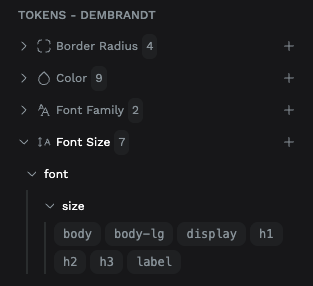
Penpot gets a native token set that binds to shape properties and is themeable:
- color
- spacing
- borderRadius
- fontSizes, fontWeights, fontFamilies
- letterSpacing
Tested end to end: one extraction plus one Penpot MCP pass produced a 38-token set.
Extract the live site
Figma: a file populated with color styles, text styles, and variables. Penpot: a native design-token set (colors, spacing, radii, font sizes, weights, families) in the Tokens catalog, themeable and bindable to shape properties. Both derived from the live brand and ready to build components on, verified against the extraction.
More in AI Pipelines
Browse all
All recipes →
Continue reading
Getting started
Install Dembrandt and turn any public website into a complete set of design tokens in under 2 minutes. All you need is Node.js and a terminal.
MCP
Use Dembrandt as a tool inside Claude Code, Cursor, Windsurf, or any MCP-compatible editor. Your agent extracts live design tokens automatically when you ask.
Skills
43 UX and design system skills for AI agents. Install once, your agent designs with hierarchy, WCAG standards, and brand accuracy. The UX knowledge that normally costs senior consultant days.