One drift report, three destinations
Overview
A Dembrandt run produces a JSON, an HTML report and an exit code. None of them care where they end up. Commit the report into a wiki as the record, post the changed tokens as a PR comment as the nudge, and pin a Figma comment only when drift grows. Any CI that can write a file can do it; the example below is Azure Pipelines, the GitHub Actions version is in the CI drift gate recipe.
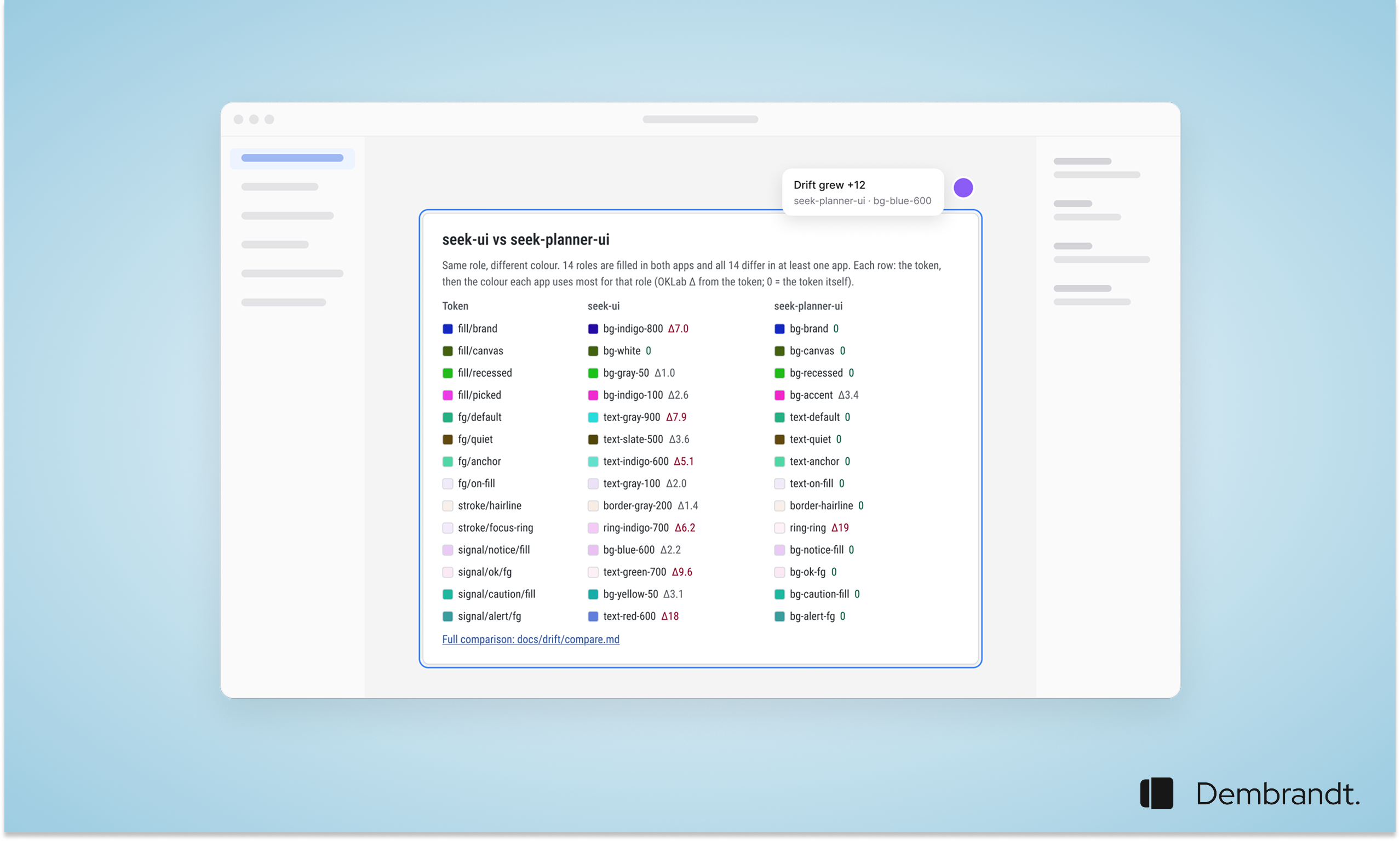
Two sibling web apps share one Figma library: one on Tailwind v3 with years of hand-picked palette classes, the other on Tailwind v4 with its own token block. The question the design system owner kept asking was how far either codebase had drifted from the design system, and whether the two apps still looked like siblings. The answer is to stop thinking of the report as something you open and start treating it as a file the pipeline routes. Dembrandt writes JSON with --json-only, a self-contained HTML report with --html and exits 1 when --compare finds drift, so every destination a pipeline can write to is a destination for the report. Three drift views feed three destinations. A source scan per app counts colour uses that bypass the tokens. A cross-app comparison resolves every colour in both apps to hex and matches it to the nearest token of the same role. Dembrandt supplies the third view: what the browser actually paints per route, compared against a snapshot of an approved release, which catches colours inherited from component libraries, chart palettes that inline their own colours, runtime-computed styles and dark mode that was never wired. Where the reports go depends on who reads them. The wiki is the record, updated on every push to main. The PR comment is the nudge, naming the exact off-token classes a change added. The Figma comment fires only when drift grows, so designers see regressions and never noise. The first run found all 17 shared roles differing between the two apps, including the same wrong shadcn accent colour in both.
How it works
Snapshot an approved release of each app as its baseline
On every test deploy: compare, exit 1 on drift, write the wiki report
Accept an intentional design-system release as the new baseline
Rendered drift runs as a pipeline job after the test deploy. Apps behind Entra ID keep their session in sessionStorage, where cookies and headers do not reach, so point Dembrandt at a test-only unauthenticated design route or a storage-state login.
A wiki page per app with drift history and worst files, a PR comment naming the off-token values a change added, a Figma comment only on regressions, and a rendered drift report per route with exit 1 when the browser output leaves the approved baseline.
More in Automation
Browse all
All recipes →
Continue reading
Getting started
Install Dembrandt and turn any public website into a complete set of design tokens in under 2 minutes. All you need is Node.js and a terminal.
MCP
Use Dembrandt as a tool inside Claude Code, Cursor, Windsurf, or any MCP-compatible editor. Your agent extracts live design tokens automatically when you ask.
Skills
43 UX and design system skills for AI agents. Install once, your agent designs with hierarchy, WCAG standards, and brand accuracy. The UX knowledge that normally costs senior consultant days.